What MP3+G is, and why new songs are hard to get
MP3+G pairs an MP3 audio file with a CDG graphics file that draws the lyrics on screen. It’s what most karaoke machines, CDG players and DJ or KJ rigs still read. Getting new songs for them usually means buying fixed-catalog tracks one at a time, hunting for files your machine will play, or making do with an old library that never has the song people want. Beltr makes new MP3+G files from the music you already own, on your own computer.
From song to MP3+G in four steps
Add a song
Add an MP3, FLAC, WAV or MP4 you own. Karaoke files you already have, like CDG and MP3+G, come in as they are.
Remove or lower the vocals
Beltr’s on-device AI (MDX-Net) splits the lead vocal from the instrumental in a minute or two, with no upload. How clean it sounds depends on the song’s mix.
Let the lyrics sync
Beltr finds the lyrics on LRCLIB, or writes them out with an on-device speech model when none are found, and times them word by word.
Export MP3+G
Choose where the files are going, check the karaoke preview, and export a standard
.mp3and.cdgpair. CDG and.karare there too.
The export screen
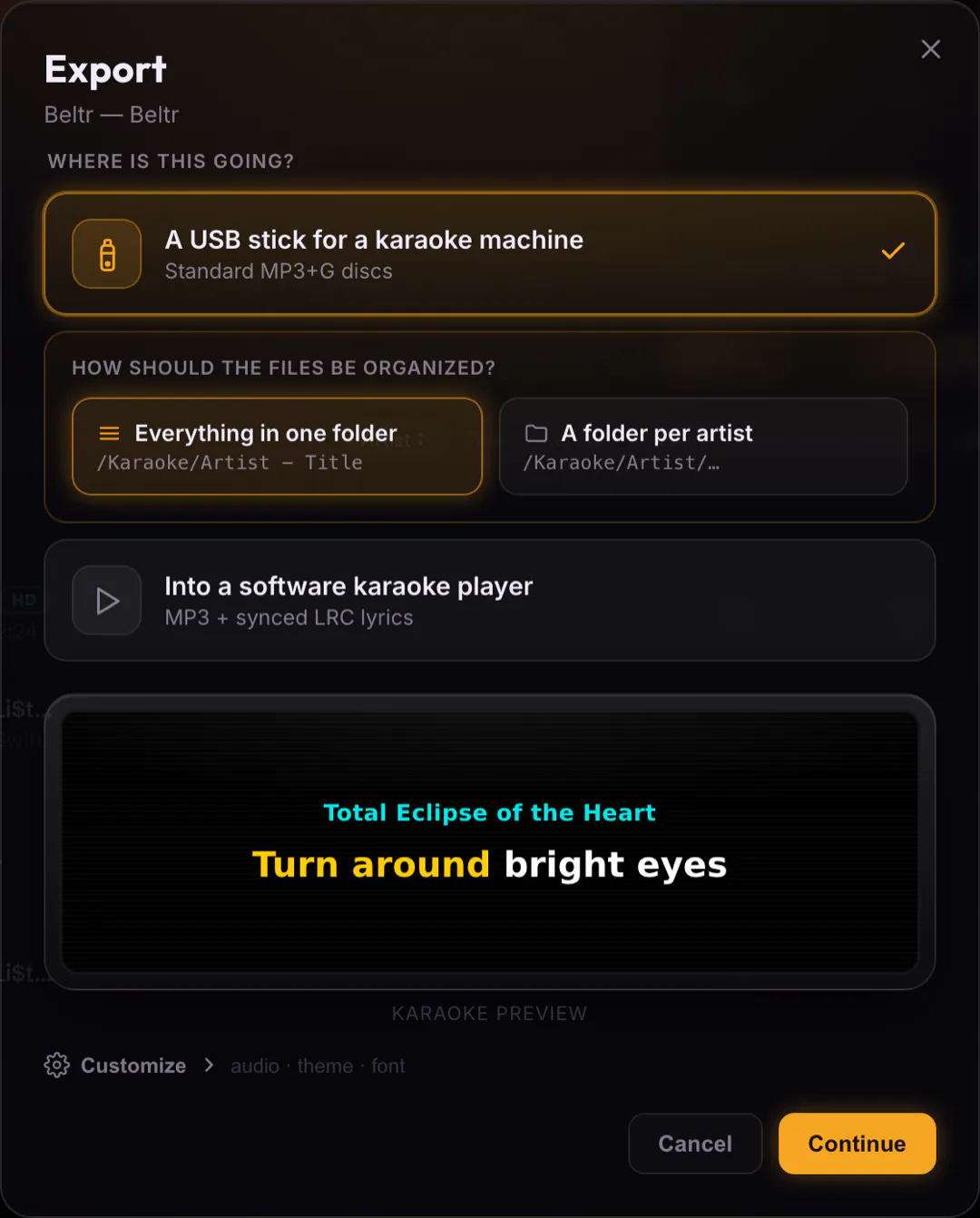
- USB stick or folder
- Write a whole library straight to the drive your karaoke machine reads, or to any folder.
- Folder layout
- Lay the files out the way your player browses: all in one folder, a folder per song, or a folder per artist.
- Instrumental or guide vocal
- Export the clean instrumental, or a guide-vocal mix with the vocal on one channel and the music on the other, for machines with a vocal-cancel switch.
- Theme and font
- Style the on-screen lyrics and watch the karaoke preview change before you export.
Whether a file plays depends on the formats your player supports. Beltr exports MP3+G for machines and players that handle MP3+G or CDG playback, so check yours first.
Bring your old CDG library
Beltr plays CDG, MP3+G, .kar, .mid and Thai NCN files as they are, zipped MP3+G included, so a library you’ve collected over the years sits next to the tracks Beltr makes. There’s no AI step for these: the lyrics and timing come straight from the file, and legacy text encodings and CJK fonts are handled, so older and non-English discs display properly. You can filter the library down to just the MP3+G tracks.
Or skip the discs
You don’t need a karaoke machine to use what Beltr makes. Play the song straight from Beltr instead: the lyrics light up word by word on your TV, guests queue songs from their phones, and a pitch bar scores every line. Practice mode loops the hard part and slows a song down without changing its pitch. Hosting karaoke at home covers that setup, and how to make your own karaoke tracks walks one song through from start to finish.
Beltr next to buying more tracks
| Beltr | Per-song stores | Subscription apps | Free karaoke videos | |
|---|---|---|---|---|
| Uses songs you already own | Yes | No | No | No |
| New karaoke tracks | Made by AI from your files | Pre-made only | Pre-made only | Pre-made only |
| MP3+G export | Yes | Buy each file | No | No |
| Plays your CDG library | Yes | No | No | No |
| Price | $19.99 once | Per song | Monthly | Free, with ads |
| Runs on | Mac, Windows, Linux | Varies | Varies | Browser |
Every song Beltr separates also keeps both stems, the instrumental and the vocal on its own, so you can export it again later with a different mix, theme or folder layout. Everything here happens on your own computer, with no account and nothing uploaded. That makes it practical for karaoke collectors, DJs and anyone who wants to keep control of their own library.