Home Karaoke Software For Any Song You Own | Beltr
One-time purchase $19.99 no subscription, ever Try 5 songs free

Home karaoke · party mode · any song you own

Karaoke night at home,
with any song you own.

Beltr puts synced lyrics on your TV and lets guests queue from their phones. Buy once. No subscription. Nothing leaves your machine.

One-time purchase $19.99
No monthly subscription Mac, Windows, Linux Phone remote queue Local AI vocal separation

The problem

Karaoke apps still feel stuck in the past.

Most karaoke options force you into a fixed song catalog, a monthly subscription, or random lyric videos online with ads and uneven quality. Beltr is built for the way people actually host karaoke at home: your songs, your TV, your friends, your night.

  • No fixed catalog
  • No subscription required
  • No awkward lyric video hunting
  • No passing around one remote
  • No cloud-only workflow

Party mode

Built for the living room.

Five things that turn a laptop and a TV into a real karaoke setup your friends will actually use.

TV Lyrics

Put big, readable karaoke lyrics on the main screen so everyone can sing along, even from the couch.

Phone Remotes

Guests scan a QR code and control the party from their phones — no app store install, no logins.

Song Queue

Let everyone add songs and take turns without crowding the laptop. The next singer is always ready.

Pitch Scoring

Score singers live for a game-night feel. Compete for the crown — or just laugh at the leaderboard.

Any Song Library

Use your own music files instead of waiting for a catalog to have the song. If you own it, you can sing it.

Record & Share

Beltr films your performance as you sing and drops a vertical clip on your phone—ready to post, text, or save. Made on your machine, shared only when you tap.

Local AI Vocals

Beltr lowers or removes the lead singer with on-device AI — no cloud upload, no per-song fees.

How it works

Start a karaoke night in minutes.

Install Beltr, point it at your music, and your living room is the stage.

1

Add your music

Import songs from your own library — MP3, FLAC, or WAV. No streaming catalog to argue with.

2

Let Beltr make it karaoke

Local AI separates vocals so you can lower or fully remove the lead singer on every track.

3

Put lyrics on the TV

Use the full-screen display for clean, readable, synced lyrics. Plug into HDMI or cast wirelessly.

4

Let guests join

Guests scan the QR code, queue songs, and control playback from their phones. The host laptop stays untouched.

Practice room

And when the party's over, get better.

Beltr isn't only for a full living room. Pull up any song on your own and drill the part that keeps tripping you, with nobody watching.

  • Slow it down, keep the pitch

    Drop any song to 50% speed with no chipmunk effect, so you can finally hear the run before you sing it.

  • Loop the hard part

    Set A, set B, and the tricky eight bars repeat until they're muscle memory.

  • A private scoreboard

    Beltr tracks your weak lines across every attempt and keeps it to itself, off the party leaderboard.
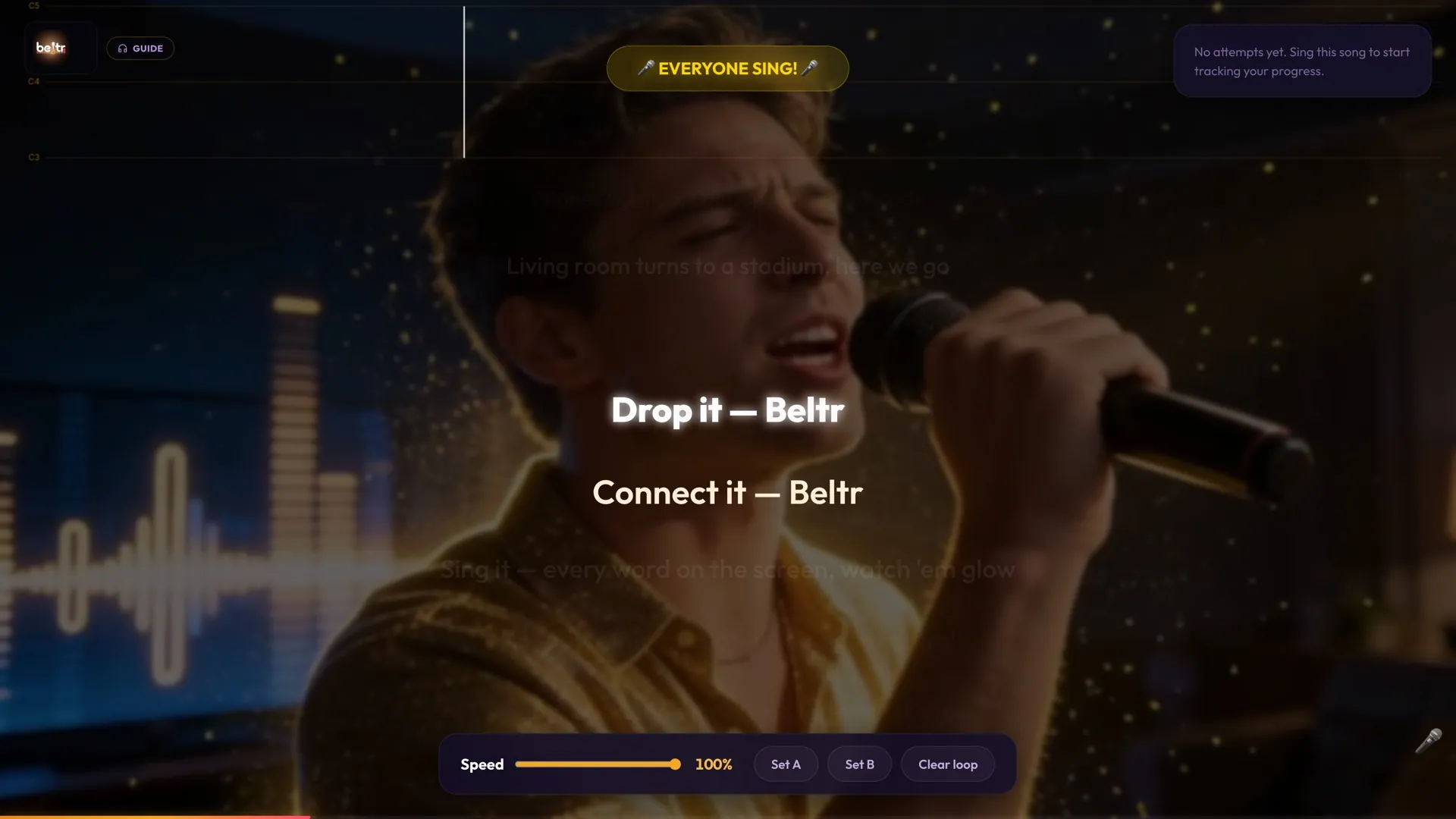
Beltr Practice Mode: a speed slider and A and B loop controls under the lyrics, practicing solo

Use cases

Perfect for more than house parties.

If there's a TV, a laptop, and people who want to sing, Beltr fits the room.

Family Game Night

Replace charades with a sing-off everyone — even the cousins — actually wants to play.

Birthday Parties

Give the birthday person the mic and the queue. Their songs, their night.

Holiday Gatherings

Christmas, New Year's, Thanksgiving — every long family hang gets better with a song queue.

Dorm Nights

Laptop, smart TV, group chat full of singers. Beltr is the cheapest setup that doesn't feel cheap.

Bachelorette Parties

Queue up the bride's anthems and let everyone take a turn. No bar tab required.

Backyard Parties

Roll out a TV or projector, run Beltr off your laptop, and the patio becomes the stage.

Friendsgiving

After the food coma, before the dishes — one karaoke round to seal the night.

Weekend Hangouts

The default plan when nobody wants to leave the couch but everyone still wants to do something.

Comparison

Why Beltr instead of regular karaoke apps?

A straight look at the four common ways people try to host karaoke at home.

Beltr Subscription karaoke apps Free karaoke videos online Mobile karaoke apps
Use your own songs Yes No No Rarely
No monthly subscription Yes Monthly fee Free, with ads Often paid tier
TV party mode Yes Some No No
Phone remote queue Yes No No No
AI vocal removal Yes — on-device Pre-made only Pre-made only Limited
Pitch scoring Yes Some No Limited
Offline / local processing Yes No No No
Mac / Windows / Linux All three Varies Browser only Phone only

Local · offline · yours

Your party does not need a cloud catalog.

Beltr processes songs locally on your computer. Once installed, you are not locked into a streaming catalog or forced to hope the song your friends want is available.

  • Local AI vocal separation
  • Works with your own files
  • No subscription lock-in
  • No fixed catalog
  • Desktop-first for real TV setups

Download

Download Beltr for your karaoke night.

Pick your OS. Five songs free, no credit card.

Signed & notarized by Apple. Opens with no warning.

Windows SmartScreen may appear because Beltr is a new indie app.

Portable AppImage — runs on most distros.

Get the .deb for Debian & Ubuntu-based distros.

Windows without the Store? Download the .exe installer · triggers SmartScreen

Pricing

Buy once. Sing whenever.

Start with the 5-song free trial. If Beltr works for your setup, unlock it with a one-time $19.99 purchase.

One-time purchase

$19.99

One-time · no subscription · lifetime updates

No cloud servers to rent, no investors to pay back — built by one developer, sold once. That's why it's $19.99, not a subscription.

  • 5-song free trial
  • One-time $19.99 — no subscription
  • Lifetime updates
  • 2 devices per license
  • Secure checkout (14-day refund)
Try 5 Songs Free or buy now — $19.99 →

Full download page · See all pricing details · AI karaoke maker

FAQ

Home karaoke questions.

Does Beltr include a song catalog?

No. Beltr is designed for your own music files and karaoke libraries, not a fixed streaming catalog.

Can guests use their phones?

Yes. Beltr includes a party mode where guests scan a QR code and use their phones to queue songs and control the session. No app install required.

Can I use Beltr on my TV?

Yes. Beltr is designed for desktop-to-TV karaoke setups with full-screen lyrics. Connect via HDMI or cast wirelessly to a smart TV.

Does Beltr remove vocals?

Yes. Beltr uses local AI vocal separation (Demucs v4) to lower or remove lead vocals from songs in your library — all on your own computer.

Is Beltr a subscription?

No. Beltr is a one-time purchase. No subscription, ever. Lifetime updates included.

Does it work offline?

Yes. Beltr processes songs locally once installed. No cloud upload, no streaming dependency.

Can I use any song?

Beltr is designed for music files you own or have rights to use.

What platforms does Beltr support?

macOS (Apple Silicon), Windows 10/11, and Linux (AppImage or .deb).

How many people can join?

Beltr is built for a typical party — a host computer plus several phone remotes on the same Wi-Fi network.

Ready when you are

Make tonight a karaoke night.

Turn your computer, TV, and music library into a full karaoke party system.

Try 5 Songs Free

Mac, Windows, Linux · One-time $19.99 · 5 songs free, no card