Make MP3+G Karaoke Files From Songs You Own | Beltr
Limited launch pricing $19.99 $49.99 60% off Claim launch price

MP3+G karaoke maker · CDG import · CDG export

Make MP3+G Karaoke Files
From Songs You Own.

Beltr imports CDG libraries, removes vocals with local AI, and exports MP3+G files for compatible karaoke machines, CDG players, DJ rigs, and in-car karaoke systems.

Limited launch pricing $19.99 $49.99 Save 60%
Mac, Windows, Linux Local AI processing CDG import + MP3+G export 5 songs free · no card

Song file

MP3 · FLAC · WAV

AI vocal removal

Demucs v4 · on-device

Synced lyrics

Word-by-word timing

MP3+G export

.mp3 + .cdg standard

Karaoke machine

CDG · USB · disc

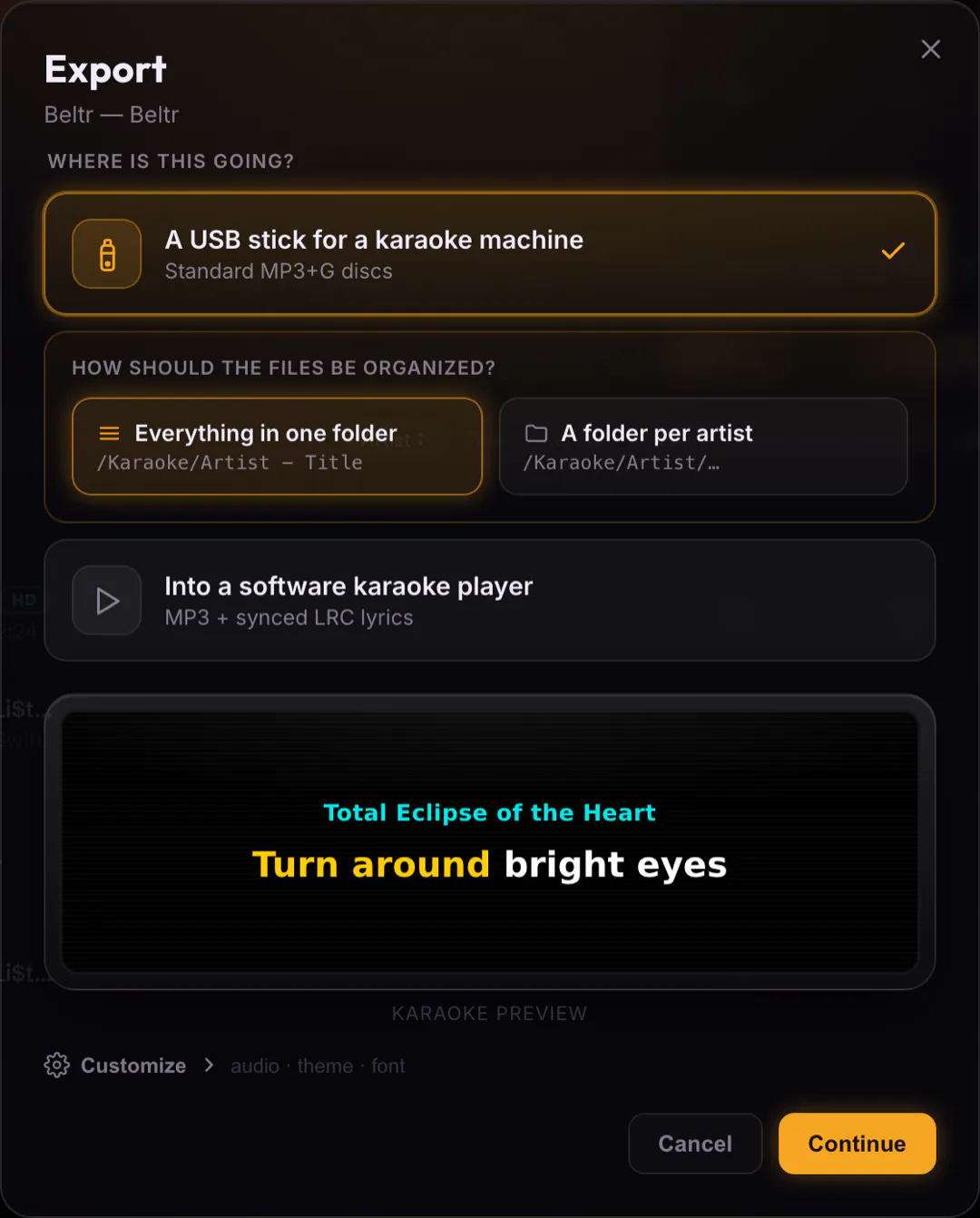
The export screen

Pick a theme. Preview the lyrics. Export.

Choose a karaoke theme and font, see exactly how the on-screen lyrics will look, then render a standard .mp3 + .cdg package for your machine.

Beltr's MP3+G export screen: a live lyric preview on the left, with theme swatches, audio mode, font, and filename options on the right.
The MP3+G export screen in Beltr — live lyric preview, karaoke themes, and one-click .mp3 + .cdg export.

The problem

Still buying karaoke tracks one song at a time?

Most karaoke machines and CDG players still depend on MP3+G/CDG files. That usually means buying fixed-catalog tracks one at a time, hunting for compatible files, or dealing with old libraries that never have the songs people actually want to sing.

Beltr gives your existing karaoke setup a modern upgrade.

  • Use your own music files
  • Create new karaoke tracks with AI vocal separation
  • Import existing CDG / MP3+G libraries
  • Export files for compatible karaoke hardware
  • Keep everything local on your computer

How it works

From song file to MP3+G in a few steps.

No catalog hunting. No web uploads. Just your music, your machine, and a clean MP3+G package.

1

Add a song

Import MP3, FLAC, WAV, or your existing karaoke files. Beltr handles the messy edges of legacy CDG libraries automatically.

2

Remove or lower vocals

Beltr uses local AI vocal separation (Demucs v4) to create a karaoke-ready mix on your computer — no cloud upload.

3

Sync the lyrics

Build a clean karaoke display with readable, timing-aware lyrics. Tweak by hand if a line needs a nudge.

4

Export MP3+G

Save a compatible MP3+G package — standard .mp3 + .cdg — for supported karaoke machines and CDG players.

Compatibility

Built for karaoke hardware owners.

Bridge modern AI vocal separation with the karaoke gear you already trust.

Karaoke machines

Create MP3+G files for compatible home karaoke systems.

CDG players

Keep legacy CDG workflows alive with modern AI processing.

DJ & KJ rigs

Build custom karaoke tracks for private events and party libraries.

In-car karaoke systems

Export files for systems that support MP3+G / CDG playback.

Existing CDG libraries

Bring your old MP3+G karaoke files into a modern desktop app and play them next to new AI tracks.

USB / disc workflows

Drop exported MP3+G onto a USB stick or burn it for hardware that expects disc-style karaoke files.

Compatibility depends on your player's supported file formats. Beltr exports MP3+G for systems that support MP3+G/CDG playback.

Comparison

Why Beltr instead of buying more karaoke tracks?

Compare the fastest paths to a karaoke track that plays on your hardware.

Beltr Per-song stores Subscription apps Free karaoke videos
Use songs you already own Yes No No No
Create new karaoke tracks Yes — AI Pre-made only Pre-made only Pre-made only
MP3+G export Yes Buy each file No No
CDG import Yes No No No
Local / offline processing Yes Varies No No
One-time purchase $19.99 once Per song Monthly Free, with ads
Mac / Windows / Linux All three Varies Varies Browser only
TV party mode Yes No Some No
Phone remote queue Yes No Some No

Local · offline · private

Your music stays on your computer.

Beltr processes songs locally on your desktop. Once installed, you are not locked into a streaming catalog or cloud-only workflow. That makes it practical for karaoke collectors, DJs, and anyone who wants control over their own library.

  • Local AI vocal separation
  • No cloud catalog gatekeeping
  • No monthly subscription
  • Works with your own files
  • Built for desktop workflows

Download

Download Beltr for your desktop.

Pick your OS. Five songs free, no credit card.

Signed & notarized by Apple. Opens with no warning.

SmartScreen may appear because Beltr is a new indie app.

Portable AppImage — runs on most distros.

Get the .deb for Debian & Ubuntu-based distros.

Windows without the Store? Download the .exe installer · triggers SmartScreen

Pricing

Buy once. Make karaoke forever.

Start with the 5-song free trial. If Beltr works for your setup, unlock it with a one-time $19.99 launch purchase.

Limited launch pricing

$49.99 $19.99 Save 60%

One-time · no subscription · lifetime updates

  • 5-song free trial
  • One-time $19.99 launch price
  • Lifetime updates
  • 2 devices per license
  • Secure checkout (14-day refund)
Try 5 Songs Free or buy now — $19.99 →

Full download page · See all pricing details

FAQ

MP3+G & karaoke machine questions.

What is MP3+G?

MP3+G is a karaoke format that pairs an MP3 audio file with a CDG graphics file for lyric display on compatible karaoke machines and players.

Will Beltr work with my karaoke machine?

Beltr exports MP3+G files for machines and players that support MP3+G/CDG playback. Check your device's supported formats before buying.

Can I import my old CDG files?

Yes. Beltr supports importing existing CDG / MP3+G karaoke libraries. Imported tracks sit next to AI-made tracks in the library and are clearly marked.

Does Beltr include a song catalog?

No. Beltr is designed for your own music files and karaoke libraries, not a fixed streaming catalog.

Does Beltr work offline?

Yes. Beltr processes songs locally on your desktop once installed. No cloud upload, no streaming dependency.

Is this a subscription?

No. Beltr is a one-time purchase during launch pricing.

Can I use any song?

Beltr is designed for music files you own or have rights to use.

What audio formats are supported on input?

MP3, FLAC, and WAV. Beltr also imports existing MP3+G / CDG zip files.

Which platforms does Beltr run on?

macOS (Apple Silicon), Windows 10/11, and Linux (AppImage or .deb).

Ready when you are

Give your karaoke machine new songs.

Use modern AI vocal separation, keep your existing karaoke hardware, and export MP3+G files from your own music library.

Try 5 Songs Free

Mac, Windows, Linux · One-time $19.99 launch price · 5 songs free, no card